


Organizing an online business with Bing

February 20, 2014

Every month as a business owner and blogger I learn new tips and shortcuts that make my work time a little easier. I usually want to keep my time on the computer at a minimum and with so many distractions wanting to pull and tug every time I open my laptop, I have to stick with a consistent plan of action:)


Work space work time} IHOD

desktop} IHOD

I have set aside times in the day for email, blogging, social media, outreach, and brainstorming. You can get a good idea of what our day in the life looks like in this post.

When you are running two businesses it can easily take over your life if you aren’t careful. ESPECIALLY if you work from home. So it doesn’t take over my most important role in my family, I have to make the most of the little time I have and stay focused.
Bing-rewards1

I have started to use a few tools that really help me stay organized across the board so today, I am going to share how Bing is one my greatest tools to stay organized:

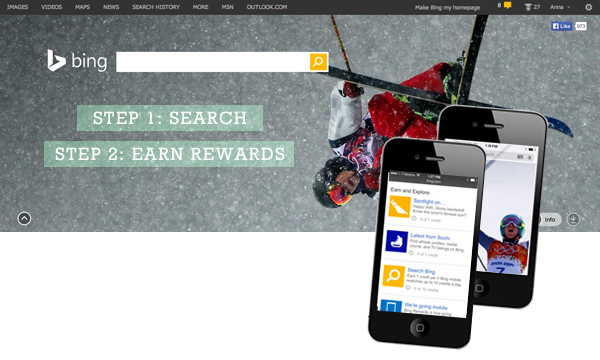
BING – The newest member of my online resource family:) I started to hear a good deal about Bing Rewards through fellow entrepreneurs and bloggers so I thought I would give it a whirl. Easy to use, just as much results as google, and what I feel like is an intuitive search engine.  I really love how it is not loaded in ads and has a clean (and entertaining) interface. I use this on all our devices (computer, ipad, and iphone). There are options to view web results, image results, browse history, etc. which makes it a very convenient all in one resource for me!

ALSO, I found out about their Rewards Program and I decided it was time to make Bing my home page. We are now in a serious long term relationship;) The major bonus is that you can actually earn gift cards for using Bing. You rack up credits just by using Bing to search the web, and when you have enough rewards, you can redeem for gift cards to popular stores such as Amazon, Starbucks, Sephora, Groupon, etc. Yep, I kid you not. This was such an exciting thing to learn about and put into play! You can use the rewards program on your mobile now as well! It integrates really well with pinterest which is another reason to get on board, and leads me to my next point…

Pinterest – The easiest way for me to save future project ideas or note brands I want to work with. I have private folders for both The Brand Market and IHOD. I will save social media sharing ideas, brands and companies that I hope to work with, mood boards, color schemes, etc.  I am able to pin images straight from Bing to pinterest, which blew my mind! I was looking up places for our next local notes feature (hint below;)), and was able to pin straight from the search results!
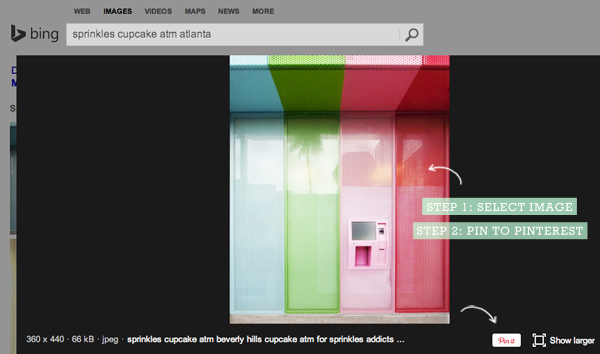
image search

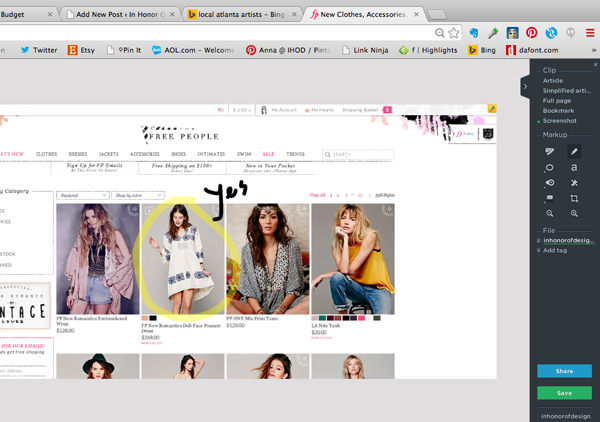
Evernote –  After I discover a website I want to come back to, I can actually write out notes onto the screen before taking a screenshot. You can install the small widget on your internet browser to pull up the options on the side whenever you are on a page. I will search via Bing, pull up results, mark up to remember what I specifically came to the site for, screenshot, and save to a folder. Its a lifesaver!
evernote

Of course I still use a good old notepad and paper calendar for keeping days straight and to-do lists in order! Although I sure wish Bing had been around when I first started blogging. I would have stacks of gift cards by now earned through search rewards! Ha! What about you? I would love to hear about the way you stay organized for your home and business!

x, Anna

All photos by Chelsey Heidorn Photography

I’m required to disclose a sponsored partnership between our site and Bing. I have been compensated in exchange for this post in the form of payment, product or experiences.

Leave a Comment

  • Love these tips! These are my favorite types of blog posts. I so enjoy seeing how someone else organizes and manages their time and it’s always a plus to come across new tools to use! I will give Bing a whirl! And – I’ve been using Evernote for a while but clearly not as effectively as I could be, as I’ve only been using it on my phone! Thanks for sharing!

  • Very helpful, Anna! Thanks! I’m thinking I need to look into Evernote. You do such a beautiful job with your blog. The hard work definitely shows.

  • Wow, I had no idea Bing could do all of that! Thanks!

  • Great tips! I need to look into Evernote. I just discovered IFTTT. I really like using it for images to twitter. When I post to instagram or fave something on Etsy it automatically posts the full images to my twitter account. There are several other ones you can make yourself. I have a lot of fun making “Recipes” and streamlining my time on the internet. https://ifttt.com/p/lovelyclusters

  • Awesome tips!! I made bing my mobile search engine! I had no idea about the rewards program ~ how fun!!
    I currently use & love Evernote & Pinterest is my electronic hoarding friend. 🙂
    Thanks for sharing!!

  • Consider this post officially bookmarked, I am always looking for new tips, tricks and advice.

    Meghan Silva’s Blog

  • […] Organizing an online business with Bing | In Honor Of Design http://inhonorofdesign.com/Every month as a business owner and blogger I learn new tips and shortcuts that make my work time a little easier. I usually want to keep my time on the computer at a minimum and with so many distractions wanting to pull … […]

  • Maybe I should give myself a bit more credit, I do actually use Pinterest in the same way. Pining ideas for later. I do think I need to up my game in terms of the notepad, it gets kinda confusing and would like to try a programme which helps with that.

    Buckets & Spades

  • Is it really that amazing. The features you mentioned were awesome. I will try Bing now..

  • […] – This app is so helpful for organization, and I have rambled about it before. I use it mainly on my desktop, but all the info syncs to your app, which you can pull up anywhere. […]

  • […] make awesome things happen that’s for sure. (Read about why I use Bing for my business here.) I hope I get the chance to party with them+ the effervescent Alison Faulkner in the near future! […]

  • Sophie Olive

    Great tips on staying organized! I completely relate to the challenge of managing multiple businesses from home while keeping work-life balance in check. The Bing rewards angle is clever – getting something back for searches you’d do anyway makes sense. I’ve found that having dedicated tools for different tasks really helps maintain focus too. For anyone scaling their online business, having reliable support systems in place becomes crucial as you grow. Services like SupportYourApp can be game-changers when you need to delegate customer service while maintaining quality. Thanks for sharing your workflow – always helpful to see how other entrepreneurs structure their days!

  • Rick Novchich

    Honestly, the Bing rewards angle is the only reason I ever switched my default search away from Google too. Those gift cards add up faster than you’d think. But the bigger takeaway for me was realizing how many moving pieces actually need tracking beyond just bookmarks and notes. Once I started treating digital assets like physical ones, assigning ownership, logging status, setting reminders, everything clicked. That’s exactly where itemit software shines for keeping operations from spiraling